Tag: budgeting

  • How to Get Into a Good Budgeting Mindset

    How to Get Into a Good Budgeting Mindset

    Budgeting is a lot easier to keep doing when you think positively about it rather than negatively. It is important to think of budgeting as something that can help you achieve your goals instead of something that only takes up your time. I use the phrase “spending plan” because it feels more positive to me than the word “budgeting.” I will use these words interchangeably in this blog because they are the same. If you find a word or phrase that helps you think positively about budgeting, use it. It can help keep you in a good budgeting mindset!

    a woman thinking about how to maintain her good budgeting mindset

    Three Qualities of a Budgeting Mindset

    A good budgeting mindset is more of a set of qualities rather than one distinct way to think about budgeting. Those qualities are positive, realistic, and determined. While there may be other qualities that help you create the mindset for budgeting, these three qualities are essential.

    Positive

    Thinking positively about budgeting will help you keep doing it. One way to think about budgeting is that it is self-care. You are doing it to take care of yourself now and in the future. If you think of budgeting as a chore, or you cannot do it, or it’s too much, or it will not work, or that you do not make enough, then it will not be successful. If you go at it with optimism, you are much more likely to succeed. There is a solution to every problem; you just have to find it. Budgeting can help you get your money under control, learn more about your spending habits, pay off your debt, and plan for your financial future and these things can help you have a more fulfilling life.

    Realistic

    At the same time, though, you have to be realistic. Realistic about your spending habits, your income, and your debts. Being realistic about all of those things with yourself will help you create a better spending plan for yourself. If you are budgeting with a roommate or a partner, being realistic can be difficult. Being honest about money with the person you live with can create a financially happier household. Without it, you will likely struggle to keep up with or limit yourself in the categories you set for yourself. This can also emotionally strain a household if you or the person you are living with are having difficulties managing money.

    Determined

    You also have to be determined. If you are determined to create a budget, you will be much more likely to use it and therefore be much more successful. Having a reason to budget will help you be more determined to maintain your budget, even when you don’t want to. Your reason could be anything – paying off debts, growing your assets, finding financial freedom, or just getting to know your habits better.

    Whatever you choose can change over time as your needs change. You paid off your debt? Fantastic! Maybe you can finally save up for that vacation you need. You can even have multiple goals for your money, but sometimes it is easier to only focus on one goal until you complete it and that is perfectly okay as well. Making SMART goals can help keep you focused and determined, and they are applicable to any part of your life! Learn more in this article from Forbes Advisor.

    Budgeting Mindset: Conclusion

    How you think about budgeting and your learning style can help you determine which form of budgeting is best for you. It might take some trial and error, but eventually, you will find the one that works for you. To find a way that works for you, you could think about your personality and learning preferences. Are you hands-on, or do you prefer to let someone or something else do it for you? Do you enjoy math? Are you a person who likes to plan? Do you prefer to use cash or a card? Paper and pen or spreadsheet? There are many questions you could ask yourself to learn what works for you.

    Paper and pen will take the most work, spreadsheets are moderate, and apps take the work out of the equation. Each method requires planning, but an app might help if you need prompts. The envelope method is traditionally used for cash, so if you prefer cash or are hands-on, this may be a good method for you. You can learn more about this in the article, What Are the Types of Budgeting?

    Struggling to stick to your financial goals? My Financial Goals Workbook can help—learn more here.
  • Free Weekly Budget Template & User Guide

    Free Weekly Budget Template & User Guide

    I will go over everything you need to know about using this spreadsheet template including where to put your income and expenses, how to use the income estimation box on the side, how to make new sheets within the spreadsheet, and how to copy the spreadsheet for a new year. You can download your free weekly budget template here. If you would like to check out our other budget templates, you can see them on our Resources page.

    I like to use google sheets for my budget templates because they are free, customizable, and don’t require any of my personal information. You can also convert google sheets into excel spreadsheets if you prefer to use excel. The great thing about this conversion is that you can do it without any loss to the formatting or calculations.

    Where to put your income

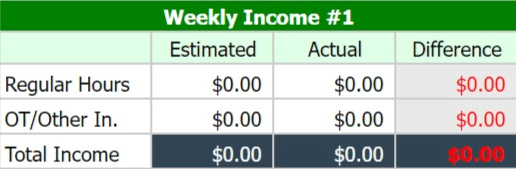
    There are four boxes for income on each month’s sheet, for each of the four weeks in a month. The image below shows what those boxes look like.

    The first column shows the type of income it is, the second column is for the estimated amount you will receive, and the third column is for the actual amount you receive. The fourth column shows the difference between your estimated and actual amounts by subtracting your actual income from your estimated income. You can either use your current paycheck for the estimated column or you can use the income estimation box on the far right of the google sheet. The estimated income column is preset to use the income estimation box outcomes.

    How to use the income estimation boxes

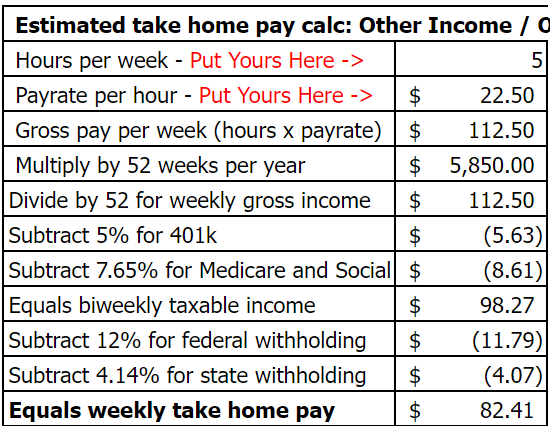
    The income estimation boxes use your weekly hours and hourly rate to calculate your after-tax paycheck. It also includes a row for your 401k or other pre-tax retirement contribution that comes from your paycheck automatically. This row is preset for a 5% contribution amount but it can be adjusted to whatever percentage you personally contribute – or it can be changed to 0% if you do not participate in any pre-tax retirement plan.

    Income estimation box for calculating after-tax income/paycheck

    This is what the income estimation box looks like for your regular hours. You start with your weekly hours and then enter your hourly pay. From there, it automatically calculates your weekly income, which shows at the bottom of the box. You can change the amount for your 401k by entering a new decimal amount in place of the current decimal. At the current preset of 5%, the equation looks like =-V11*0.05. To make it 3%, you would only change the 0.05 to 0.03.

    Income estimation box for calculating after-tax income/paycheck

    There is another income estimation box underneath the first one. This one can be used to calculate the amount you will make in overtime or if you have a second job. All of the customization rules for the first box also apply to the second box.

    If you are using it for a second job, you will use it exactly like the first income estimation box. If you are using it to calculate how much you might make in overtime, you will type in the following equation: = Regular pay rate + (Regular pay rate/2). An example of this would be =15+(15/2). The cell will calculate this number for you, and then it will finish the calculation for the income estimation.

    Where to put your expenses

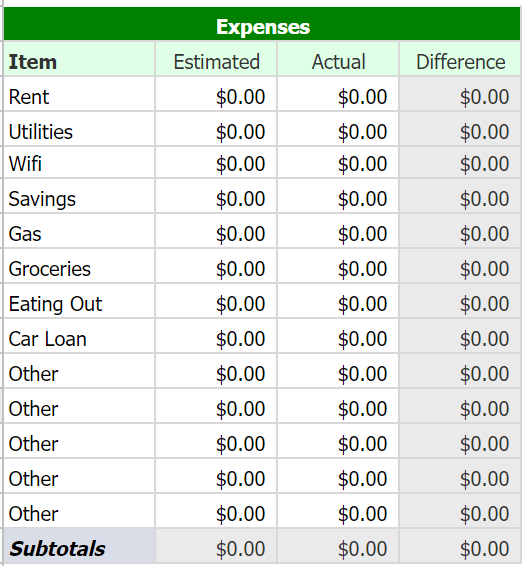
    Expenses section of budget spreadsheet

    Under the income section of the free weekly budget template, there is a row that adds up your monthly income and shows the difference between what you expected to get for the month and what you actually made. Then below that is the expenses section. There will be four of these expense boxes – one for each week. They look like the box to the right of this text. Each of those categories are completely customizable to your needs, and I recommend budgeting for bills for the week of your paycheck. An example of this is if you have a bill on Monday and you get paid on Friday, then you would budget for that bill on the Friday before that Monday.

    Just like with the income section, the expense section will show the difference between your estimated and actual expenses. As you get familiar with your expenses, you should be able to adjust your estimated amounts to be closer to your actual spending.

    Underneath the expenses section, are two more sections. Directly underneath this section will be the expenses total summary section. This section shows your estimated expenses, actual expenses, and the difference between the two for the entire month. The last section is the monthly balance summary. This section shows your cash flow for the month – all of your expenses, all of your income, and then it will show you whether you spent more or less than you made for the month.

    Google sheets tips

    How to create more sheets within an existing spreadsheet.

    If you need to make more sheets within the existing sheet, you start by right-clicking on one of the months at the bottom. This will show some options, and the one you need to click on is “Duplicate”. Then you can click and hold onto that sheet to move it to where you need it. Doing this will copy an existing sheet but keep it in the same document.

    How to make an entirely new sheet for the new year.

    If you need to make a new spreadsheet, you will start by clicking on “File” at the top left of the page. Then you will click “Make a copy”, which you will see in the first section of the drop-down menu. After that, you will see a pop-up with an option to rename the new sheet you are creating, as well as move it to a new place in your drive – if you so desire. You can also come back here for next year’s free weekly budget template!

  • How To Find A Way To Budget

    How To Find A Way To Budget

     a jar full of cash

    Intro

    There are several ways to budget, and it’s just a matter of finding the way that works for you. One way to do that is by your learning style – if you know which style is yours. Another way is deciding whether you want to be hands-on with your budget or not. The third way to find out is by deciding if you want to spend money on an app or do it yourself. Last but not least, I will explain the pros and cons of automating transactions.

    Learning styles

    There are four learning styles – visual, auditory, reading/writing, and kinesthetic. Patterns and shapes may work best for you if you are a visual learner. These can include graphs/diagrams, which you can find in apps or create in a spreadsheet.

    Speaking your thoughts helps you articulate them if you are an auditory learner. This means that it does not matter if you use an app or make a spreadsheet because you would need to explain it out loud either way.

    If you learn best using reading/writing, you understand information when it is in written form. Same as auditory learning, it does not matter which you use because either way, your budget will be in written form.

    If you are a kinesthetic learner, you learn through doing. With budgeting, you can use personal experiences. Take what you have done in the past and learn from that. If you have not budgeted before, you can use trial and error. It would help to get to know your spending and tweak it as needed.

    Hands-on or not?

    Are you a hands-on person? You may prefer spreadsheets, notes, or the envelope method if you are. Spreadsheets can help you do the math, and you’ll be able to make charts or diagrams if you like. When I say notes, I mean just jotting it down on a piece of paper or in your notes app. Then with the envelope method, you can use actual envelopes or an app/spreadsheet that mimics the envelope method.

    If you are a hands-off person, you might prefer forms of budgeting that require less control. If you have a steady income, budgeting like this could look like setting a budget and then creating auto transfers within your accounts. Some apps help you do this as well.

    a man looking at a budgeting spreadsheet, which is one way to budget

    Spend on an App or do it Yourself?

    One thing you have to consider when deciding to spend money on a budgeting app is the cost of doing so. There is almost always a free version of an app, and it is best to try that version first. That version is more than enough for your needs most of the time. If it is not, you could consider trying other free apps, but if you are dead set on one app, then spending the money on it might be worth it. Investopedia has a list of budgeting apps that they recommend here.

    The risk involved in using a budgeting app is also something to consider. Apps connect directly to your accounts to pull data from so you can use the app. This means that your accounts could be hacked because you have to allow that app constant access to them. Your bank could be hacked even if you do not use an app, but the more your information is out there, the higher the chance that something might happen.

    The reward associated with using an app is also important to think about when deciding to use one for budgeting. Using an app could take less time than budgeting by hand or using spreadsheets. Apps may also have reminders or notifications that you might find helpful. These things might allow you to focus more on the things you want to focus on instead of spending time doing something you do not want to do.

    Pros and Cons of Automating Transactions

    The Pros:

    1) It can make things easier if you do not want to transfer money around your accounts every time you get paid. Your bank will transfer the money for you at the time you scheduled for it to do so.

    2) It can make things easier if you have a money disorder. This can include gambling or impulse spending. Automating transfers can help you keep your money safe in case something happens.

    The Cons:

    1) It can make things difficult if you need full liquidity. People who need full liquidity are usually people who live paycheck to paycheck. A lot of the time, automating transactions can make your money less liquid, and when you live paycheck to paycheck, you need as much liquidity as possible in case something happens.

    2) Forgetting about automated transactions can cause you to overdraw your account. If you automate and do not have a consistent paycheck or forget the schedule you set when you automate transactions, you could overdraw your account.

    Struggling to stick to your financial goals? My Financial Goals Workbook can help—learn more here.